
macOS 13 or later · Apple silicon and Intel
What PubFile does with a .pub file
It opens Microsoft Publisher files on your Mac, shows you every page, and saves them as a PDF or as an IDML file you can keep editing in Affinity or InDesign. A report on each file tells you what to check. Nothing is uploaded and your original .pub is never modified. The first three conversions are free at full quality, so you judge it on your own documents before paying.
1.0 is in App Review. The Mac App Store link appears here the day it is approved.
How it works
- Open a .pub file. File ▸ Open, drag it onto the window, or double-click it in Finder. Open several at once; each gets a tab.
- Look at every page. Show Page Thumbnails (in the View menu) adds a sidebar. In Finder, select a .pub file and press Space to peek at it without opening the app.
- Read the report in the inspector (View ▸ Show Inspector): fonts used and which were substituted, how much of each story landed on each page, and anything that could not be converted, shown next to the page. What you see in the preview is what you get in the export.
- Export. File ▸ Export as PDF, or Export as IDML. With Pro, File ▸ Convert All Open Documents writes an IDML, a PDF and a report for every open file into one folder. Every export writes new files; the .pub stays as it was.
- Open the IDML in Affinity (free), Affinity Publisher 2 or InDesign and keep editing.
- IDML
- InDesign Markup Language: the standard exchange file for page layouts. Affinity and InDesign open it. Think of it as "a Publisher file that other programs understand".
- Affinity
- A page-layout program for Mac and Windows (affinity.studio). The current version is free; it is the natural place to keep editing a converted newsletter.
- Report
- PubFile's list of what changed in the conversion: substituted fonts, text that did not fit, objects it could not convert. It shows in the app and is saved next to IDML exports.
Multi-page documents: the part everything else gets wrong
Publisher newsletters usually use linked text boxes: one long story that flows from a box on page 1 into a box on page 3, and so on. The open-source parser that LibreOffice and PubHarbor rely on (libmspub) has never implemented that link. Instead it puts the entire story into every linked box, so page 1, page 2 and page 3 each show the whole article, and the last page comes out empty. The bug has been open in LibreOffice's tracker since 2013 (bug 67299, "text is repeated on all pages"). PUB Reader's one-star reviews describe the same symptom; we have not inspected its code.
PubFile's own parser work handles linked text boxes: the story is split across the boxes the way Publisher laid it out, and linked boxes stay linked in the IDML.
Proof, on the file from the bug report
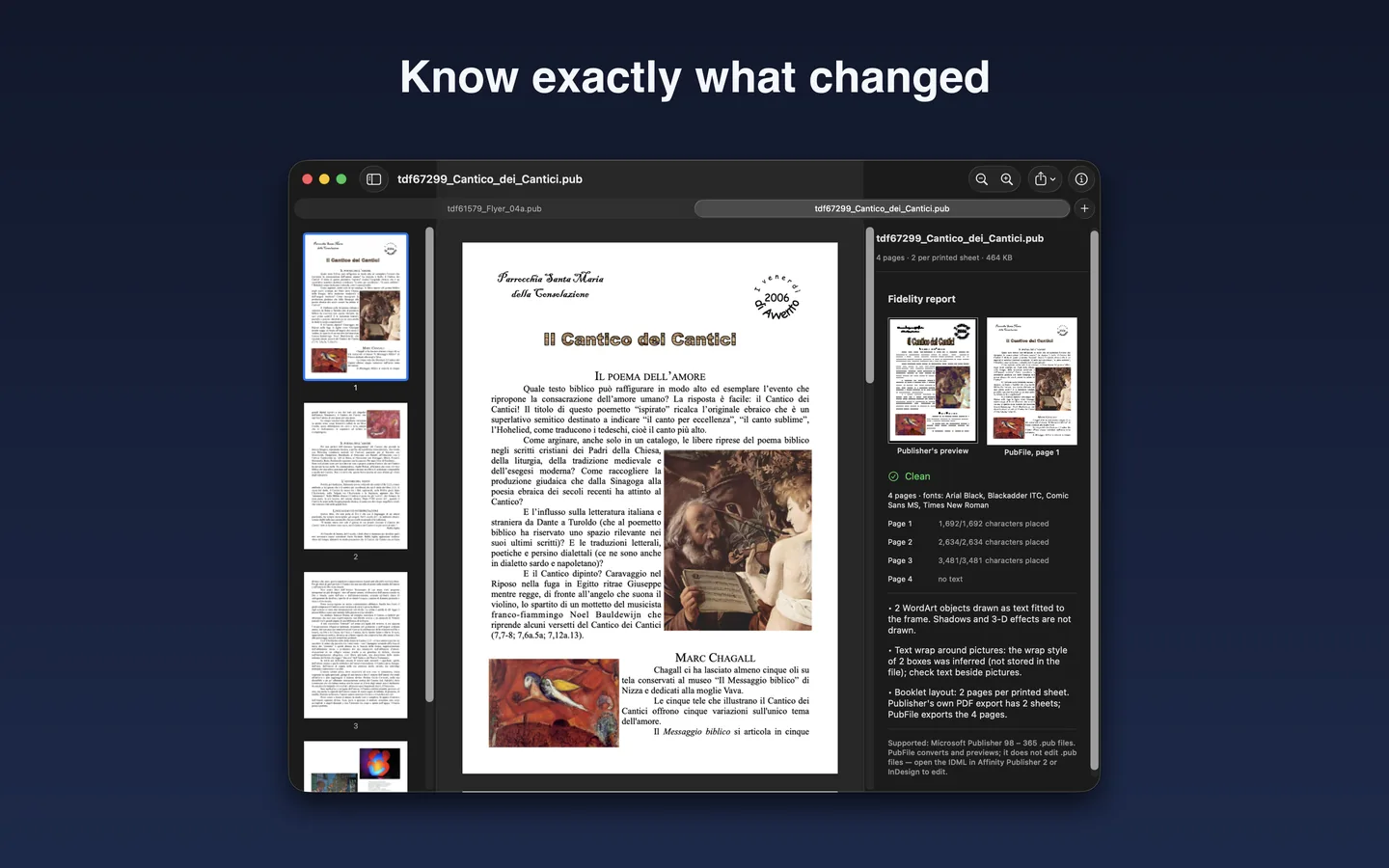
Try it yourself: download the same file (464 KB, from a public bug tracker) and open it in LibreOffice or PubHarbor, then in PubFile. Page 2 should start where page 1 ended.
What comes out
IDML (InDesign Markup Language)
A documented, zipped-XML page-layout format. Pages, text frames with live text and paragraph and character formatting, linked text boxes reconnected, pictures extracted at original resolution into a Links folder, shapes, colours and tab stops. Opens in:
- Affinity (2025 release, free) and Affinity Publisher 2 / 1.8+, confirmed by Affinity.
- Adobe InDesign, any version that imports IDML (CS4 onward).
Affinity's own note on IDML import applies: page structure, text frames and basic styles are preserved, "some advanced formatting, like GREP styles, anchored objects, and tables, may require manual adjustment." In 1.0, tables render in the preview and PDF but are not written to the IDML; the report says so when a file has them.
One PDF per file, vector text (searchable, selectable), images embedded at original resolution, page size as set in the document.
The report
Shown in the inspector for every file you open, and saved as <name>.report.txt and .json next to every IDML export (free or Pro); Convert All writes one for every file. It is not a font inventory dressed up as a report; it is a check. It lists:
- Pages detected and pages written.
- For each story and page, how many characters were placed and any text that did not fit.
- Fonts referenced, which are installed on your Mac, and what was substituted.
- Objects the converter could not handle (embedded OLE objects, some WordArt warps and 3-D or shadow effects, tables in IDML).
- A single verdict per file: clean, check, or problems, with plain-English notes.
Supported files
- Publisher 98, 2000, 2002, 2003, 2007, 2010, 2013, 2016, 2019, 2021 and Microsoft 365 (.pub).
- Publisher 97 and earlier: not supported, the format is different and no open parser exists for it. If you have these, export them from a working Publisher while you can.
- Password-protected files: not supported.
Free and Pro
Free: open and preview any number of files, Quick Look in Finder, the report, and three full-quality conversions to IDML or PDF. PubFile Pro ($29.99 USD, one in-app purchase, no subscription): unlimited export plus Convert All Open Documents. Side by side
The free conversions are unrestricted: pick your longest newsletters. If the report says "problems" and the result is not worth $29.99 to you, do not buy. Pro is sold only through the Mac App Store; refunds go through Apple (how that works).
What PubFile is not, and what 1.0 does not do
- It is not Publisher for Mac. You cannot edit .pub files in it, and it does not save .pub files. It gets your content out into formats that have a future.
- It is not a cloud service. There is no upload, no account, no analytics, and it works offline. Privacy
- It is not perfect. Publisher has thirty years of features. In 1.0: tables are drawn in the preview and PDF but not written to the IDML; some Publisher-specific effects (certain WordArt warps, 3-D and shadow styles, embedded OLE objects such as pasted spreadsheets) have no equivalent in IDML and are reported rather than silently dropped. The report names each one, with the page.
- It does not handle Publisher 97 or password-protected files.
Requirements
macOS 13 Ventura or later. Apple silicon (M1 and later) and Intel Macs. No internet connection needed after installation.
Microsoft Publisher is a trademark of Microsoft Corporation; PubFile is not affiliated with Microsoft. PubFile includes code from the libmspub and librevenge libraries (LibreOffice project, Mozilla Public License 2.0); source for those components is available on request from mrr.rajat.contact@gmail.com, and the notice is in PubFile ▸ About PubFile.